JSON Services (Legacy)
Patriot includes a set of JSON services which are required by certain features of the ICA Advanced Module and/or Patriot's JSON SDK module. In many circumstances it is important that JSON communication on these services is encrypted for added data security. This document explains how to enable Patriot's JSON services and then how to enable SSL on the Patriot Data Service's JSON communication port.
:::caution Deprecated
The usage of these services is deprecated, and should not be used for new development. See Third Party Integrations for our currently recommended integration methods for new development, including an updated REST API.
:::
Prerequisites
- JSON services can only be activated on Patriot installations registered with either the ICA Advanced module or the JSON SDK module(On Patriot v6.4, JSON Service can only be activated with JSON SDK module).
Configuration
Locate the AppSettings.json file located within the Patriot server installation folder. This file is normally found in,
C:\\Program Files (x86)\\Patriot Systems\\Patriot Data Service
OR
C:\\Program Files\\Patriot Systems\\Patriot Data Service (on 32 bit machines)
Always make a backup copy of your Data Service config file before making changes.
Open the AppSettings.json file using a text editor. The JSON settings are as follows,
{
  "DataService": {
    "JsonSdk": {
      "Enabled": true,
      "UserName": "patriot",
      "Password":"Patriot12##",
      "Port": 9005,
      "Encrypted" : true,
      "CertificateThumbprint": "AABBCCDD"
    }
  }
}
Add these settings in if they don't exist and set the values as required:
Port. Port the service is working on. This will need to be port forwarded to, through your firewall, if you wish to use the JSON service externally.
Encrypted If set to True, enables HTTPS encryption. It is highly recommended you enable encryption if you are using the JSON service remotely (ie outside the LAN).
CertificateThumbprint. Thumbprint of the TLS certificate used to secure HTTPS traffic, when encryption is enabled. The certificate must be installed in Local Computer Certificates, in the 'Personal' store. If multiple clients will be connecting to your JSON services then you will need to obtain your certificate from a trusted certificate authority. In other circumstances a self-signed certificate may suffice.
Enabled. Needs to be set to True before the JSON service is run.
UserName and Password. The data service always sets the Http Client Credential Type to Basic. So a matching Username and Password must be supplied with every request. It is highly recommended that you change the username and password from the default values.
Now restart the Patriot Data service and Patriot's JSON services will attempt to start on your chosen port.
Depending on your server setup, you may need to add an HTTP Namespace Reservation on the selected JSON port before the services will run.
You can now test that the services are accessible over HTTP by browsing the services with a web browser on the Patriot server.
E.g. browse to the URL http://localhost:9001/JsonClientService/GetClient?clientno=0001BASE01
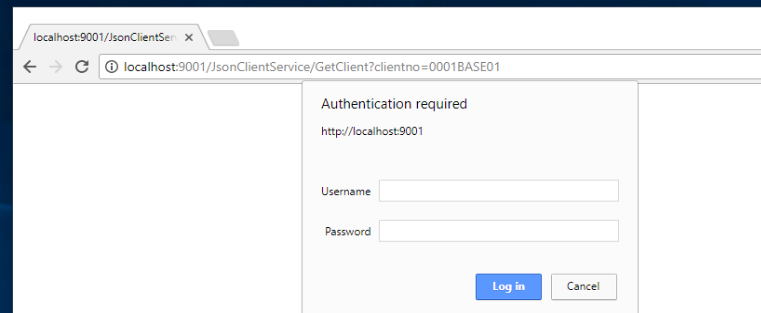
AppSettings.json).Contact Patriot Support for the full list of JSON commands available.