ICA Dashboard
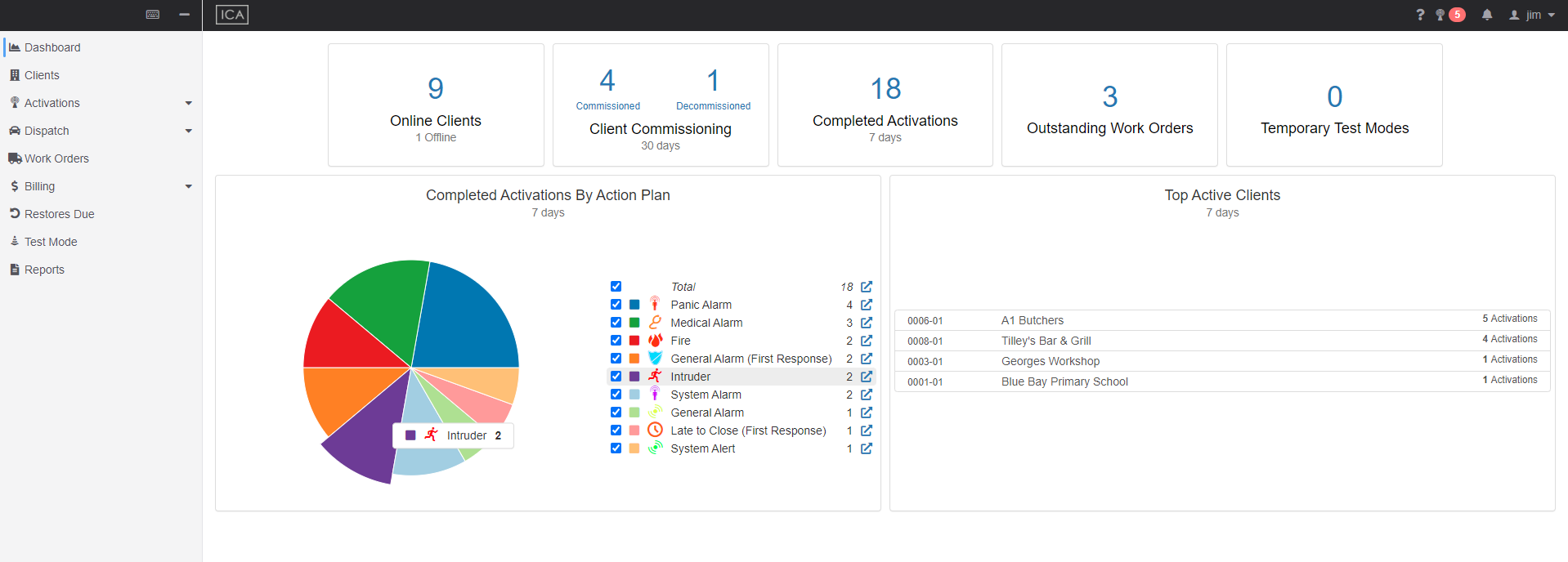
The ICA Dashboard feature provides ICA users with an interactive overview of their data.
Both the content and layout of the dashboard are able to be configured.
This document outlines the following:
- Required Security Right
- Import Customised Dashboard
- Configuration JSON Format
- Layout Overview
- Available Panel Types
Required Security Right
The ICA Dashboard is available only to users with "Extended Access" or "Monitoring". See more details at Web Access Levels.
Following options become available when above groups are selected.
- Built-in Dashboard Access: Users can access the default dashboard template which is provided by Patriot.
- Full Dashboard Access: Users can access all templates in the maintenance menu. If this option is un-ticked, users can only access specific templates.
Import Customised Dashboard
We support JSON to customise dashboard. The JSON file can be imported via Maintenance > General > Dashboard.
Configuration JSON Format
The dashboard configuration JSON allows specifying:
- Which panel types are visible.
- The configuration options for each panel.
- The size and location of each panel
The configuration must be valid JSON. The structure is as follows:
  [
    // For each row in the dashboard:
    [
      // For each panel in this row:
      {
        "type": "ClientCount", // See Available Panels for available panel types
        "width": "Sixth", // See Layout Overview
        "options": {
          ... // See Available Panels for options per panel type
        }
      }
    ]
  ]
Download an example config file
Layout Overview
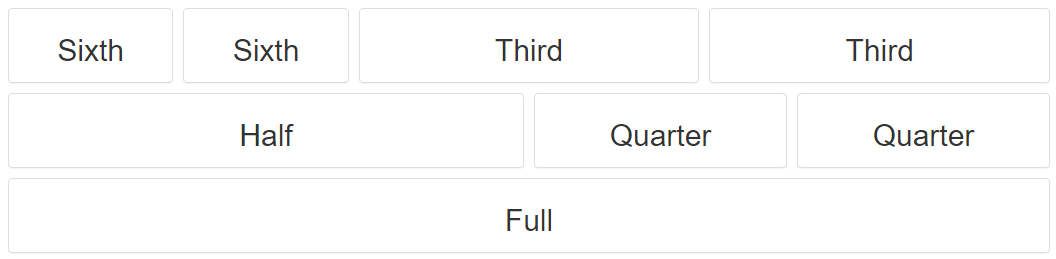
A dashboard is made up of a number of horizontal Rows where each Row contains a number of Panels.
The width of each panel can be configured to one of the following options:
- Full
- Half
- Third
- Quarter
- Sixth
The configured width represents the horizontal ratio of the screen that will be used for that panel.
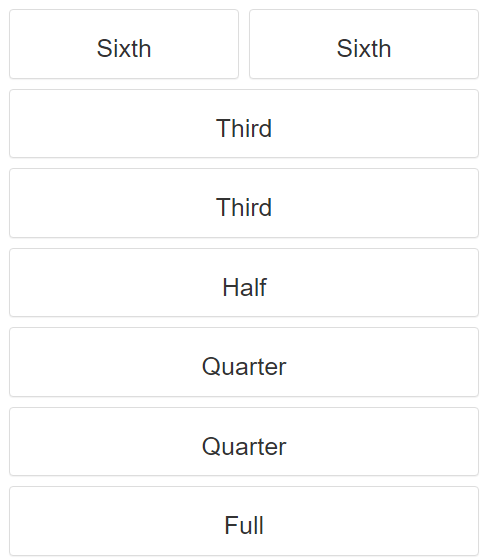
On small screens (i.e. mobile) panels may extend to better display their content.
Available Panel Types
In the following list TypeScript style type annotations are used.
I.e.: "?" Indicates that a property is optional
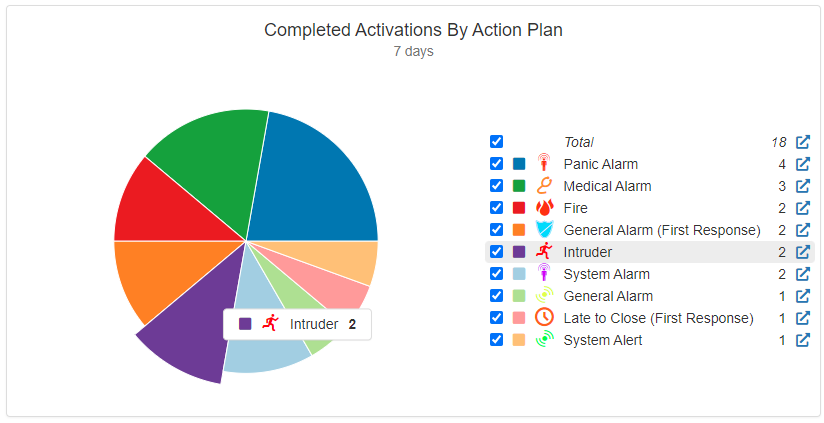
Panel: Completed Activations By Action Plan
"type": "ActivationsByActionPlan"
Options Structure
{
    title?: string;
    subtitle?: string;
    // How often to refresh the data for this panel
    refreshInterval?: Duration
    // The timespan to fetch data for
    windowSize?: Duration
  }
Options Example
"options": {
  "title": "Completed Activations By Action Plan",
  "subtitle": "Last 7 days",
  "refreshInterval": { "minutes": 10 },
  "windowSize": { "days": 7 }
}
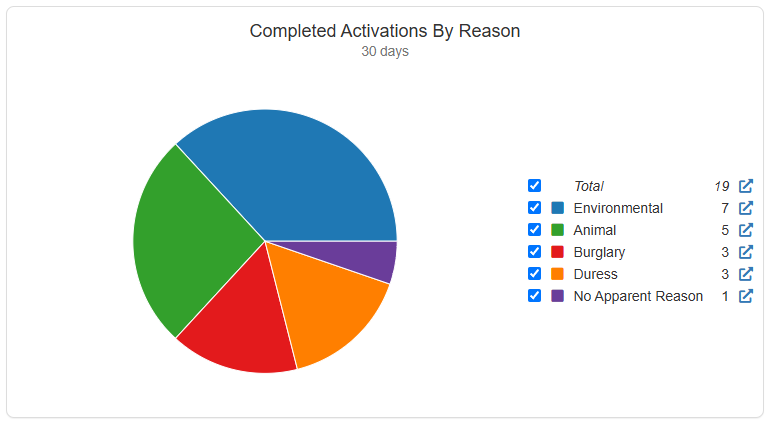
Panel: Completed Activations By Reason
"type": "ActivationsByReason"
Options Structure
{
    title?: string;
    subtitle?: string;
    // How often to refresh the data for this panel
    refreshInterval?: Duration
    // The timespan to fetch data for
    windowSize?: Duration
  }
Options Example
"options": {
  "title": "Completed Activations By Reason",
  "subtitle": "Last 7 days",
  "refreshInterval": { "minutes": 10 },
  "windowSize": { "days": 7 }
}
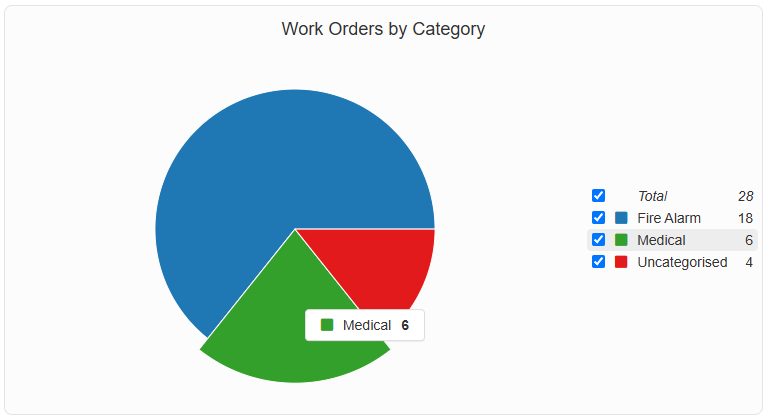
Panel: Work Orders By Category
"type": "WorkOrderByCategory"
Options Structure
{
  title?: string;
  subtitle?: string;
  // How often to refresh the data for this panel
  refreshInterval?: Duration;
  // Set true to fetch in-process work orders (requested, pending and accepted)
  includePending?: Boolean;
  // Set true to fetch completed work orders
  includeComplete?: Boolean;
  // Set true to fetch cancelled work orders
  includeCancelled?: Boolean;
  // Filter results by chargeable state
  chargeableStates?: Array<"PENDING_REVIEW" | "NOT_CHARGEABLE" | "CHARGEABLE">;
  // Filter results by work order type (defaults to "Standard")
  workOrderType?: "Standard" | "DispatchJobs" | "PatrolJobs";
  // Filter results by work orders with a particular assigned category
  workOrderCategoryIds?: number[];
}
Options Example
"options": {
  "title": "Completed Activations By Reason",
  "subtitle": "Last 7 days",
  "refreshInterval": { "minutes": 10 },
  "includeComplete": true,
  "chargeableStates": ["Chargeable", "PendingReview"],
  "workOrderCategoryIds": [7, 12, 23]
}
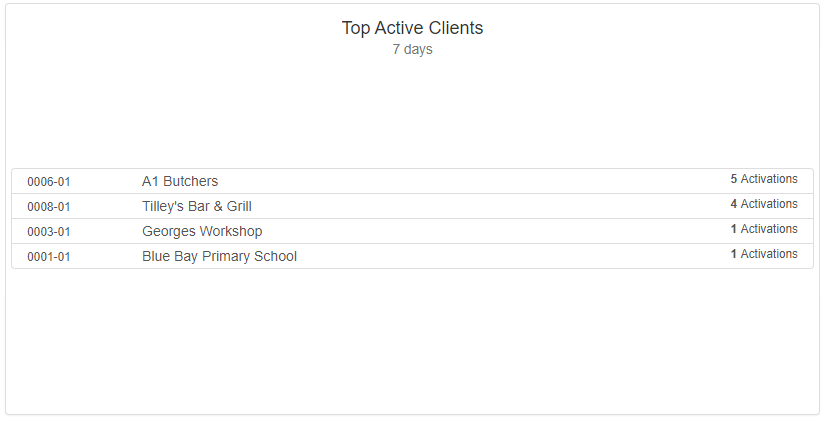
Panel: Top Active Clients By Activations
"type": "ActiveClients"
Options Structure
{
    title?: string;
    subtitle?: string;
    // How often to refresh the data for this panel
    refreshInterval?: Duration
    // The timespan to fetch data for
    windowSize?: Duration
  }
Options Example
"options": {
  "title": "Top Active Clients",
  "subtitle": "Last 7 days",
  "refreshInterval": { "minutes": 10 },
  "windowSize": { "days": 7 }
}
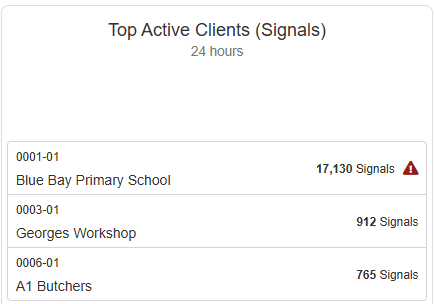
Panel: Top Active Clients By Signals
"type": "ClientsBySignal"
Options Structure
{
    title?: string;
    subtitle?: string;
    // How often to refresh the data for this panel
    refreshInterval?: Duration;
    // Signal threshold for showing the runaway alarm alert
    alertThreshold?: number;
    // The timespan to fetch data for
    windowSize?: Duration
  }
Options Example
"options": {
  "title": "Top Active Clients (Signals)",
  "refreshInterval": { "hours": 1 },
  "alertThreshold": 1440,
  "windowSize": { "hours": 24 }
}
Panel: Online / Offline Client Count
"type": "ClientCount"

Options Structure
{
    title?: string;
    // whether to show offline count (defaults to true)
    includeOffline?: boolean;
    // determines if a client's commissioned date must be set to be counted as online (defaults to false)
    onlyCommissioned?: boolean;
    // How often to refresh the data for this panel
    refreshInterval?: Duration
  }
Options Example
"options": {
  "includeOffline": true,
  "onlyCommissioned": false,
  "refreshInterval": { "minutes": 10 }
}
Panel: Completed Activations
"type": "CompletedActivationsCount"

Options Structure
{
   title?: string;
   subtitle?: string;
   // How often to refresh the data for this panel
   refreshInterval?: Duration;
   // The timespan to fetch data for
   windowSize?: Duration;
   // Filter results by activation reason
   reasonsIds?: number[];
   // Filter results by related action plan
   actionPlanIds?: number[];
   // Filter results by action plan
   actionPlanGroupIds?: number[];
 }
Options Example
"options": {
  "title": "Completed Activations",
  "subtitle": "Last 7 days",
  "refreshInterval": { "minutes": 10 },
  "windowSize": { "days": 7 },
  "actionPlanIds": [4, 15, 16],
  "actionPlanGroupIds": [3]
}
Panel: Client Commissioning
"type": "OnlineOfflineCount"

Options Structure
{
    title?: string;
    subtitle?: string;
    // How often to refresh the data for this panel
    refreshInterval?: Duration
    // The timespan to fetch data for
    windowSize?: Duration
  }
Options Example
"options": {
  "title": "Client Commissioning",
  "subtitle": "Last 7 days",
  "refreshInterval": { "minutes": 10 },
  "windowSize": { "days": 7 }
}
Panel: Outstanding Work Orders
"type": "OutstandingWorkOrderCount"

Options Structure
{
  title?: string;
  subtitle?: string;
  // How often to refresh the data for this panel
  refreshInterval?: Duration;
  // Set true to fetch in-process work orders (requested, pending and accepted)
  includePending?: Boolean;
  // Set true to fetch completed work orders
  includeComplete?: Boolean;
  // Set true to fetch cancelled work orders
  includeCancelled?: Boolean;
  // Filter results by chargeable state
  chargeableStates?: Array<"PENDING_REVIEW" | "NOT_CHARGEABLE" | "CHARGEABLE">;
  // Filter results by work order type (defaults to "Standard")
  workOrderType?: "Standard" | "DispatchJobs" | "PatrolJobs";
  // Filter results by work orders with a particular assigned category
  workOrderCategoryIds?: number[];
}
Options Example
"options": {
  "title": "Outstanding Services",
  "subtitle": "Last 7 days",
  "refreshInterval": { "minutes": 10 },
  "includeComplete": true,
  "chargeableStates": ["CHARGEABLE", "PENDING_REVIEW"],
  "workOrderCategoryIds": [7, 12, 23]
}
Panel: Temporary Test Mode Count
"type": "TemporaryTestModeCount"

Options Structure
{
  title?: string;
  subtitle?: string;
  // How often to refresh the data for this panel
  refreshInterval?: Duration
}
Options Example
"options": {
  "refreshInterval": { "minutes": 10 }
}
Type Definitions
Duration
A duration can be one of:
-
Object
{years?: number;quarters?: number;months?: number;weeks?: number;days?: number;hours?: number;minutes?: number;seconds?: number;milliseconds?: number;}i.e. to represent 10 minutes:
"refreshinterval": { "minutes": 10 } -
Number - Indicates a value in milliseconds.
i.e. to represent 10 minutes:"refreshinterval": 600000 -
String - Indicates an ISO8601 Duration.
i.e. to represent 10 minutes:"refreshinterval": 600000