Reports by User
Reports to Users deal with reporting from a users point of view. It is quite common for a user to be assigned to more than one client, e.g. an installer, or a business owner. Here you can print reports for a user, showing only the clients assigned to them. The report can also emailed if this module have been installed.
The user must be directly assigned to all clients (including areas). No support for user templates is provided for users requiring Report By Users issued to them.
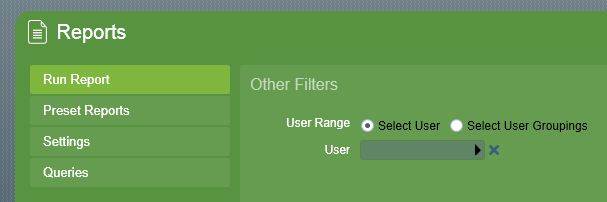
User Range
The User Range selector allows either to select one single user or to select a user grouping. If one single user is selected, one report will be created according to this user. But if a user grouping is selected, one report for each user in the selected user groupings will be created. Dependent on the selected report type, Other Filters wizard step may contain more filter controls than shown in figure User Range.
For example running a report by user and selecting a user grouping with 10 users assigned. Then set in the next wizard step to run the report manually with Print Preview checked will create the Report Print Preview for the first user. When the Report Print Preview is closed for the first report, another Report Print Preview is created for the next user and so on.
Report scope for grouping members
When a report is run against a User Grouping, the clients covered by each member's report depend on how that member is assigned to the grouping:
- Globally assigned members (assigned via the user's Global Details) produce an unrestricted report covering all of the clients the user is assigned to.
- Client-specific members (assigned the grouping on a particular client via their Client Details) produce a report covering only the client(s) they are assigned the grouping on.
This lets the same user appear in a grouping's report with a different scope on different clients. A user assigned the grouping both globally and on specific clients is treated as global (unrestricted).
If output type is set to PDF, Word or Excel, each report for a user is saved as a file of the selected output type. Setting the output type to one of the email options will send the saved file to the email address specified in the user record. The Default Reporting Email Task setting in System Wide Settings controls which email task will be used to send the report.