Custom Fields
Custom Fields allow monitoring centres to store extra information against clients and users that doesn't fit into Patriot's standard fields. They are created and configured in the Maintenance > General > Custom Fields screen.
There are three types of Custom Field, each with its own tab on the maintenance screen:
- Client Fields - details about a client.
- User Global Fields - details about a user that apply on all of their sites.
- User Client Fields - details about a user that apply to one site only.
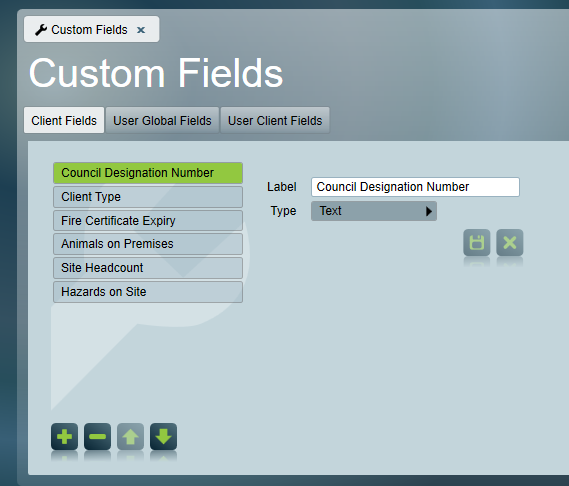
Field Settings
Fields may be free text, multi-line text, numeric, date/time, yes/no or a selection from a configurable list. The order in which the fields are displayed can be adjusted using the arrow buttons during configuration.
Client Fields
Client Fields hold information about a client that is otherwise not displayed within the client context. They are displayed and edited in the Custom Fields section of the client's Reporting Tab.
User Global Fields
User Global Fields hold information about the user themselves, which stays the same on every site they are assigned to. They are displayed on the Custom Fields tab of the user's Global Details. See Users Tab for more information.
User Global Field values can also be viewed from the User Maintenance screen (Maintenance > Users > User Maintenance).
User Client Fields
User Client Fields hold information about a user's relationship to a particular site. The same user can have different values on each of their sites. They are displayed on the Custom Fields tab of the user's Client Details. See Users Tab for more information.
User Client Field values can also be viewed from the User Maintenance screen, by selecting one of the user's clients on the Clients tab.
Advanced Search
All three types of Custom Field can be used as search criteria in the Advanced Client Search. User Global and User Client Fields have (User Global) or (User Client) after the field name. Searching on one of these returns clients that have a user with a matching value.