Billing Settings
Billing
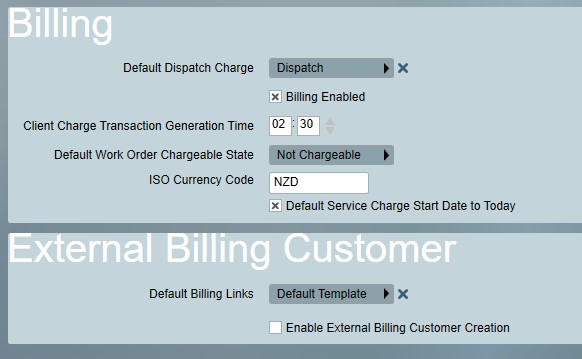
Default Dispatch Charge
The default charge that should be assigned to new dispatch jobs.
Billing Enabled
Enables automatic service charge billing according to their assigned Charge Period. Note that when this option is first enabled the first client charge transaction generation may not take place until the following day.
Client Charge Transaction Generation Time
The time of day to automatically generate service charge billing transactions.
Default Work Order Chargeable State
Sets the initial chargeable state for new work orders and dispatch jobs.
ICO Currency Code
Specifies the currency symbol to use when displaying charges. This must be a valid ISO 4217 Currency Code. I.e. USD for United States Dollar, AUD for Australian Dollar or EUR for Euro.
Default Service charge start date to today
Sets the default service charge start date to today for new service charges. If unchecked, the start date will be left empty.
External Billing Customer Settings
Default Billing Links
Specifies the default billing URL link template. Billing link templates can be configured from the main Billing menu under Billing Links. See Billing Overview for more information. The default template can be overridden at the customer level if necessary.